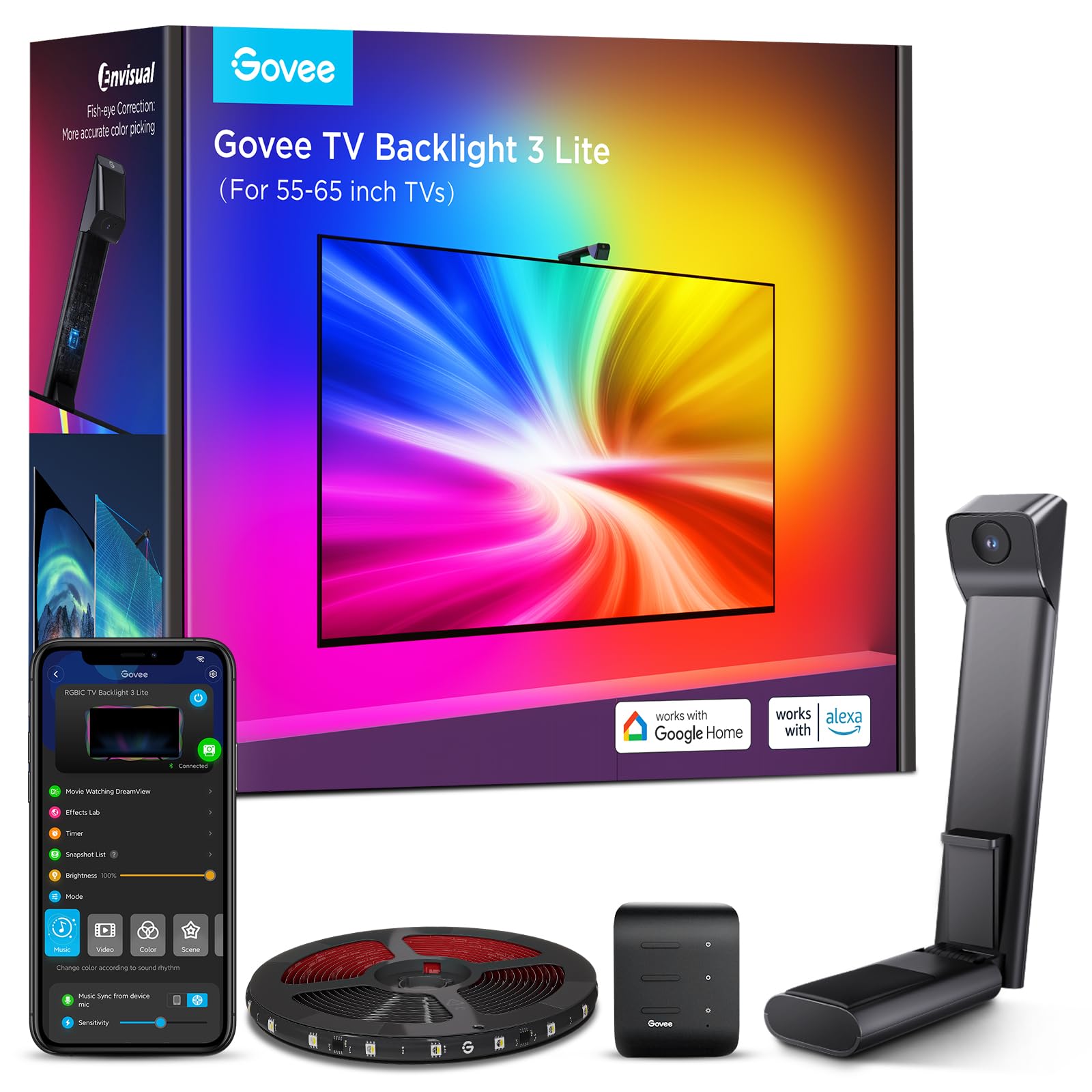
Govee TV Backlight 3 Lite with Fish-Eye Correction Function Sync to 55-65 Inch TVs, 11.8ft RGBICW Wi-Fi LED Strip Lights with
4.5 | 7,979 ratings
Price: 69.99
Last update: 12-17-2025
About this item
- Upgraded Govee Envisual Technology: The upgraded chip provides stronger performance with a fish-eye correction function, expanding the effective range to provide more accurate color-matching along the edges.
- 4-in-1 Lamp Bead: RGBICW TV lights add an extra warm white chip into the color mix, a purer white tone and the improved pixel density make the lighting effect more vivid and natural, which helps enhance immersive movie watching and gaming.
- Gravitational Hanging Design for Camera: Simplify installation and adapt for ultra-thin TVs. You can use the adhesive to stabilize it without wobble, when installing the camera.
- Govee DreamView Syncing: The function realized the linkage of Govee lights. Add up to 7 sub-devices to sync the lighting effects of the 3 Lite, create a 360° immersive view experience, and enrich the light mapping effects within the home environment.
- Full Compatibility for Any TV Content: The 3 Lite can instantly capture the color of any TV screen for color matching without compatibility issues. Use the TV lights while streaming content, watching online videos, gaming, etc.
- Smart Activation: Manage your TV LED strip lights via Govee Home APP or simple voice commands via Alexa and Google Assistant. Choose from black bar elimination, blank screen detection, 99+ preset light effects, and more with a simple tap on the App.
Top reviews from the United States
- Chee HooMagical TV Backlight With Amazingly Accurate and Vivid ColorsI had very high expectations for this Govee 3 Lite backlight and it surpassed all of them by a mile. This Govee 3 Lite with proper set up, calibration and correct settings looks absolutely magnificent with beautiful and accurate colors that it adds so much to my TV viewing experience.
Most of the "bad" reviews on here is USER ERROR because the person can't bother to do even the most basic research therefore he/she doesn't know how to set it up, calibrate and adjust settings correctly. So here are some tips and settings that may help others.
For accurate colors it's vital to set your white light accurately first since all other colors blend off of white. Also your TV's brightness setting has a minor impact on the LED strip brightness as well. So I maxed out my TV's brightness and then I set my LED strip to my liking and then brought my TV's brightness back down to my normal setting of 80/100. Now I have an LG OLED and OLED's have perfect black levels and near perfect colors out of the box, so you may not get the exact results I did. But it doesn't hurt to give it a try and see if it helps your Govee set up if you are not satisfied with your colors.
1. Put the camera dead center of your TV and at 90 degrees (or as close as you can).
2. Install the light strip as close as you possibly can to the edge of your TV. I've seen youtube videos where people install them 2" to 3" inward from the edge (I get it if you have no choice because your back panel has a weird shape or is not completely flat along the edges) and that gives such a tiny light spread on the wall and also leads to dead spots in the corners because the light is set too far away and that causes the TV's corners to cast a shadow on the wall leaving a dead spot.
3. When you calibrate with the orange squares make sure the gray box ends up looking either like a rectangle or a bow tie. I added pictures of my actual calibrations of both shapes to my review to give you an idea of what I'm talking about. If your TV is wall mounted or on a TV stand where there's nothing underneath the camera that may interfere with it, I'd probably go with a rectangle shape. But after playing around with the calibration I discovered that for my set up a bow tie shape gives me the most accurate and uniform colors because I have a semi-glossy TV stand and it helps to prevent the camera from seeing past the bottom edge of my TV and catching whatever colors that are reflecting back up off my TV stand so it doesn't interfere with the actual colors coming from my screen.
4. When you adjust the "color calibration, saturation, white balance, etc." in the app do it in a dark room.
4a. "Saturation" setting needs to be dropped way down to give you accurate colors. I keep mine between 1%-5%. If you're one of many people that's having problems with your white light looking green, dropping the saturation down a lot should fix that problem and give you a nice white light that will go a long way in giving you accurate colors across the board.
5. "White balance" default is 50% but it looks a little too blue on my LG OLED so I keep my white balance a little more on the red side at 70%-75% and I get a nice slightly warmer white that works wonders in getting accurate colors all around. Google "pure white" background and use that to adjust your white balance and saturation.
6. "Relative Brightness" default is 50%. I set mine all the way up to 100% on all four sides and then I control the brightness level with the main brightness slider which when it's a bright room I set it to 100% and when it's a dark room I set it to 47% because that's the percentage I found that when the screen or parts of the screen goes dark so do the corresponding lights which only adds to the immersive viewing experience.
7. If you want your lights to show all the different colors as you watch TV you need to choose "part" in the app. If you choose "whole" you will get only solid colors on all four sides.
8. You can choose either "movie" or "game" but personally I leave mine to "movie" 90% of the time even if I'm gaming. The difference between them is with "game" the colors switch a little faster but that leads to a lot more flickering which can be very distracting. With "movie" it's a softer and smoother transition.
9. I love that I can connect my Govee kit to my Alexa app by adding it in the "skills" section which allows me to control the backlight with voice commands for things like turning the LED strip on and off or the brightness up or down or setting a timer/routine to turn the LED strip on or off at a certain time of day I set.
Thankfully I had a few weeks to do a lot of research and also check out youtube videos before Prime Day when I was able to purchase this kit for $46 for the 40"-50" size.
And it was in doing this research that made my set up super easy with no problems at all when my kit arrived. All told it took me about two hours from start to finish to install and set up my backlight settings to get it perfect for my LG OLED TV.
It took me longer than most people since I went all OCD when figuring out the exact placement, spacing, height and measurements of the lights to get the best possible light spread on my wall and it was all worth it since my LED's look fantastic because I have a full and wide light spread and the colors are so evenly dense with no dead spots in the corners like I've seen on so many other set ups.
I was worried that the whole calibration thing would be a PITA since a lot of reviewers seem to struggle mightily with getting it right. For me, it was super simple because through my research I learned what not to do and avoided all the pitfalls that plague others.
The proof is in the pudding. I've added screenshots of the settings I use and a sample video with those settings and my lights are mesmerizing and gorgeous. Check it out! - JayImmersive and Easy-to-Use TV BacklightThis Govee TV backlight adds a vibrant, immersive lighting effect to my 75–85 inch TV. The fish-eye correction function ensures the colors sync perfectly with the content on screen, enhancing movies, gaming, and shows.
Installation is straightforward, and the lights are easy to control via the app. The brightness and color options are excellent, and the backlight creates a more cinematic experience without being overwhelming.
Overall, a high-quality, fun, and effective addition to any home entertainment setup. Highly recommended for anyone wanting to elevate their TV viewing experience. - pawjaeGreat Light Quality and AmbianceGovee has been my go-to for TV lighting, and the Govee TV Backlight 3 Lite is another solid win. I have it installed on five TVs now, and the quality has been consistent across all of them. The light quality is clean, bright, and smooth, and it really upgrades the ambiance in the room whether you’re watching movies, gaming, just relaxing, or using as a night light.
The length fits a 65-inch TV perfectly with no awkward gaps. The remote control through the Govee app makes everything simple. Adjusting brightness, colors, and scenes is quick, and the functionality is exactly what I want in smart backlighting.
I’ve also had good luck with the lifespan. The strips have held up over time, and the colors stay vibrant. Overall, it’s easy to use, looks great, and keeps delivering the same performance on every TV I install it on. - Matthew I.Good overall value and new RGBIC+W is a must have for most people.This is my first TV Backlight and I have had it for about a week and overall I am very happy given the price and performance. I do not use it for gaming so my only experience is using it while watching movies and as backlight.
First, I want to make you aware there are three types of RGB lights that I commonly see in LED strip lights and while most are referred to as RGB lights there are important difference between them. I have included a brief summary below that I hope simplifies the different types.
RGB: These are the cheapest type of RGB lights and have been around the longest. The main advantages to these besides price is that most traditional RGB light strips can be easily cut thus making customizing size very easy. The main cons tend to be brightness and that they tend to be poor at producing warm white light.
RGBIC: These are a newer RGB technology and are becoming the new standard in RGB products. They are brighter and are more controllable than traditional RGB lights. The main drawbacks are that they tend to be more expensive, are still not very good at producing warm white light, and depending on manufacturer and type may not be able to be cut thus not customizable in size.
RGBIC+W: These are a newer RGB technology and maintains all the pros of RGBIC leds but the addition of a W led allows them to produce a better warm white light. The tend to be even more expensive than RGBIC lights and are slowly being rolled out in newer products. I believe they will eventually replace RGBIC LEDs in most line ups than currently use RGBIC LEDs.
I think most people that don't game will end up using the backlight as a regular TV backlight for the added ambiance/light about 80% of the time and using it in movie/music mode 20% of the time where the backlight changes colors because of this for me personally and for a lot of people the fact this has RGBIC+W LEDs make this the best choice currently on the market. Set up was easy and the app works easily with the light. The movie mode is good with action movies and it adds another element of immersion but I don't use it and imagine most people don't use it in movie mode while watching the news or dramas. Also, while I don't watch many anime/cartoon shows, I can see that it would be great with that type of content both because of the colors that they use and because they tend to be produced in aspect ratios that take up the whole screen. I have multiple modes saved and on movies with black bars I have the relative brightness on both the top and bottom strips set to 1%. The standard color mode that I use 80% of the time is great as it allows me to have indirect warm white light which adds to the ambiance of the room and provides light but as it is behind the TV doesn't cause any "washing out" of the TV light. For me this replaces a lamp plus has the additional sync function for watching movies and playing games makes it a good price to performance value. My only complaint is that in 2023/2024 it should have a higher LED density of 60/m versus the 30/m it has. I am sure that we will see that higher density as well as RGBIC+W on the next generation the dual camera model and Sync Box. The lower density is why I give it 4 versus 5 stars otherwise it's an overall good value.